
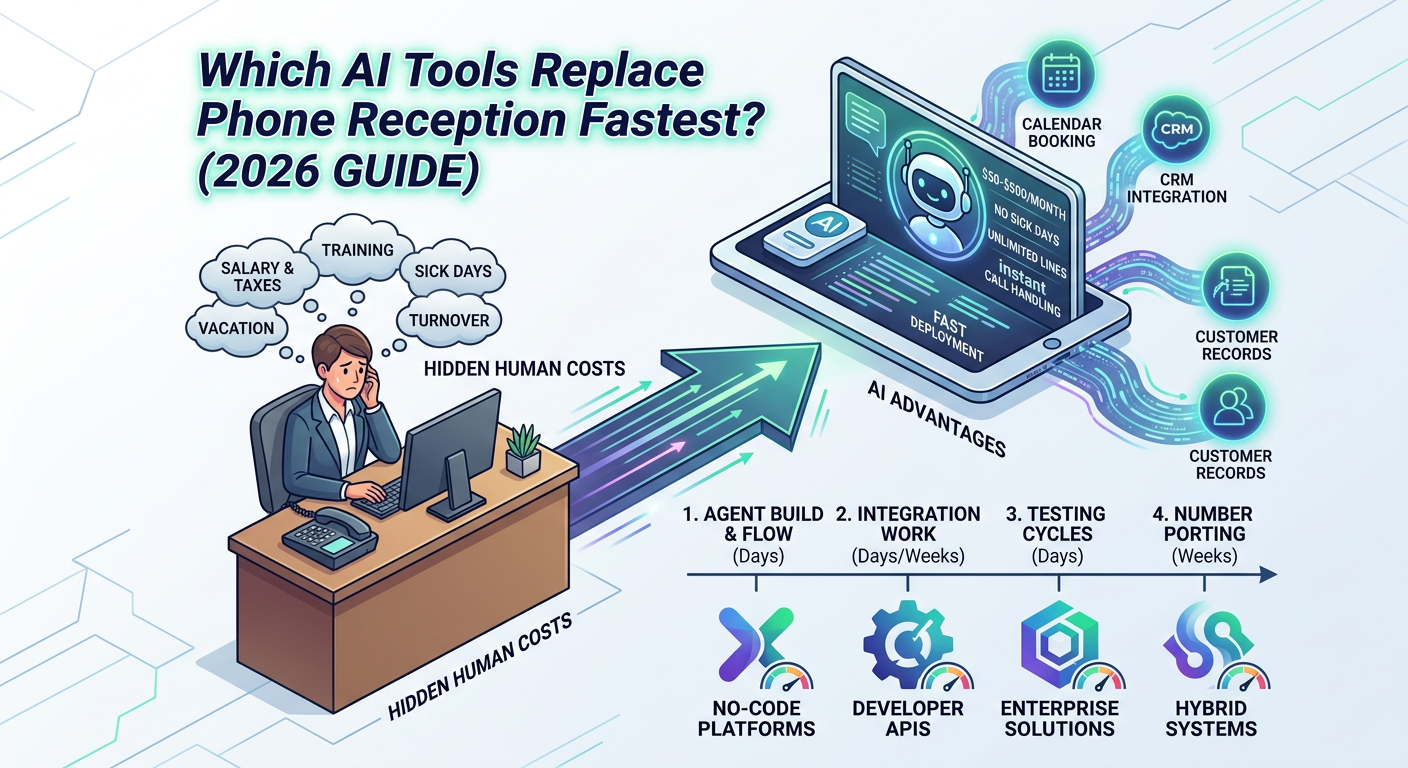
The Hidden Cost of Keeping a Human at the Front Desk
Every time a small business hires a receptionist, they're committing to more than a salary. Training time, sick days, turnover cycles, lunch coverage, and a hard ceiling on call volume are all baked in. The median US receptionist earns between $39,000 and $45,000 annually — but when you add payroll taxes, benefits, and management overhead, the true all-in cost typically lands between $55,000 and $65,000 per year.
AI phone systems now handle inbound calls for $50 to $500 per month with zero sick days, no hold music, and the ability to manage dozens of simultaneous lines. The question for most businesses isn't whether to switch — it's which AI tool gets them there fastest without botching the rollout and frustrating real customers in the process.
What "Fastest Deployment" Actually Means
Vendors love to claim you can be "live in minutes." That's technically true for a basic demo. It is not true for a production-grade deployment that handles real calls, routes correctly, books appointments, and escalates edge cases without dropping the ball. Realistic deployment involves four distinct phases that marketing pages rarely mention together:
No-code platforms compress the first three phases dramatically. Developer-focused APIs require internal engineering capacity. Enterprise platforms add procurement and IT security review that can push timelines months past the vendor's quoted estimate. Knowing which tier you're actually buying before you sign up is the difference between a two-day rollout and a twelve-week project.
The Major AI Phone Reception Tools: Real Deployment Timelines
The following table reflects realistic deployment windows for businesses without large internal IT teams — not vendor best-case scenarios. "Deployment time" means from account creation to live calls being handled reliably.
Tool
Deployment Time
Technical Complexity
Pricing Model
Best Fit
Goodcall
1–2 days
None (no-code)
$49–$199/mo flat
Restaurants, local services, retail
Synthflow AI
2–5 days
Minimal
$29–$500/mo
SMBs, clinics, service businesses
Bland AI
3–7 days
Low-code / API
~$0.09/min usage
Custom flows, dev-capable teams
Retell AI
3–7 days
Low-code / API
~$0.11/min usage
Customer service automation
VAPI
5–14 days
API / coding required
~$0.05/min + telephony
High-volume, developer-first teams
Voiceflow
1–3 weeks
Low-code builder
$60–$625/mo
Complex multi-intent conversation design
Twilio Voice + AI
2–6 weeks
Developer-heavy
Pay-per-use + dev hours
Enterprise custom voice builds
Google CCAI
4–12 weeks
Enterprise / IT team required
$0.06/min + setup fees
Large contact centers
The No-Code Fast Lane: Goodcall and Synthflow
Goodcall is purpose-built for the local business owner with zero technical staff. Connect your Google Business Profile, define your hours and services, add your FAQ answers, and the AI is answering live calls within 24–48 hours. It handles appointment questions, operating hours, location details, and basic call routing straight out of the box. The tradeoff is limited customization depth — if your intake process involves insurance verification, multi-step qualification, or branching logic across multiple service types, Goodcall will hit a hard ceiling.
Synthflow occupies a useful middle ground — still no-code, but with a more flexible conversation builder that supports branching intents and native scheduling integrations. Businesses consistently report going live in 2–5 days for standard deployments. Its pre-built connectors for Calendly, Google Calendar, and select EHR systems make it particularly well-suited to med spas, dental offices, and wellness clinics where scheduling is the primary reason most calls come in.
The Developer-API Tier: Bland AI, Retell, and VAPI
These platforms trade deployment speed for maximum control. Bland AI and Retell AI both provide Python and JavaScript SDKs with solid documentation. A competent in-house developer can have a functional agent live in 3–7 days. Businesses without developer capacity should budget 2–4 weeks minimum if outsourcing that work — and get clear scope alignment before starting.
VAPI sits at the high-capability end of this tier. It's designed for production-grade, high-volume deployments with real-time transcription, call recording, webhook-driven workflows, and deep integration hooks. The per-minute pricing floor ($0.05/min) is the lowest of any major platform, which matters significantly above 500 calls per month. The deployment ceiling, however, is higher — expect 1–2 weeks minimum even for experienced teams, and 3–4 weeks for CRM or EHR deep integrations.
The Three Deployment Killers Nobody Warns You About
Vendor timelines assume ideal conditions. Here are the three factors that most reliably blow those estimates apart in the real world.
1. Phone Number Porting
Most businesses want the AI answering their existing number — not a new one that no one has ever dialed. FCC regulations technically require carriers to complete ports within one business day for wireless and four for landline-based numbers, but real-world porting from legacy telecom providers routinely takes 5–10 business days. Some regional carriers stretch to two weeks. Plan for this explicitly. A reliable interim strategy: run the AI on a test number while porting is in progress, go live the day the port completes, and communicate a go-live date to staff accordingly.
2. Booking System Integration Testing
Every hour of testing skipped before launch turns into debugging time during a live customer call. If the AI is booking appointments into your calendar or practice management system, you need to test: double-bookings, after-hours appointment requests, different appointment durations, fully-booked scenarios, and cancellations. That alone typically requires 5–10 hours of structured test calling before any responsible go-live. Teams that skip this step routinely find real patients booked into slots that don't exist or escalations routing to disconnected numbers.
3. Escalation Logic and Edge Case Design
Who does the AI transfer to when a caller is angry, confused, or needs something outside its scope? What happens when a caller asks about something the AI wasn't trained on? Escalation design — routing to a human, triggering a callback SMS, or sending a form link — must be configured and tested before launch, not after. Most teams significantly underestimate how many edge cases their average caller generates. Budget a full day minimum for escalation design and validation, regardless of which platform you're using.
The ROI Math: When Does This Actually Pay Off?
Here's a concrete example for a med spa receiving 200 inbound calls per month. Assumptions based on industry benchmarks:
That's 35 × $300 = $10,500 per month in permanently lost revenue. If an AI system recovers even half those calls — a conservative assumption for a well-deployed voice agent — you're looking at $5,250/month in recovered revenue plus $3,750/month in receptionist cost reduction. Net gain: roughly $9,000/month against a platform cost of $200–$500/month. The payback period on a Synthflow or Goodcall deployment, even accounting for five days of setup and testing, is measured in weeks — not quarters.
For higher-volume practices or businesses where average transaction values are larger (elective procedures, legal consultations, high-end home services), the math improves substantially faster. The key variable isn't the AI platform cost — it's the dollar value of calls the business is currently losing without even knowing it.
A 5-Question Framework for Choosing the Right Tool
Before committing to any platform, answer these questions honestly — the answers will narrow the field quickly:
The AI phone reception market has compressed dramatically — what took three months to build and deploy in 2023 now deploys in days for most standard use cases. But "fastest" is only valuable if the system handles real calls reliably. A two-day deployment that confuses patients, drops bookings, or fails to escalate angry callers is meaningfully worse than a human receptionist. Build in testing time. Soft-launch on a low-traffic day. Monitor the first 100 live calls before declaring success. The businesses that get the most from these tools are the ones that treat deployment as a process — not a switch to flip.
For businesses that want a fully managed approach — where an outside team handles platform selection, integration, testing, and go-live — AI automation agencies specializing in voice deployments can compress timelines further and remove the implementation risk entirely, typically getting businesses live in 5–10 days regardless of technical complexity.