
AI Automation Cost for Law Firms: What Drives Pricing
AI automation for law firms depends on scope. Phone answering, intake automation, document workflows, practice management integrations, compliance review, and client follow-up all carry different cost drivers.
Law firm AI automation pricing depends on intake, document workflows, practice management integrations, compliance review, and follow-up complexity.
Epiphany Dynamics is an AI automation agency: we help businesses find and fix operational bottlenecks with AI receptionists, lead follow-up, and workflow automation.
Free 30-minute audit. We name at least 3 things you can automate, ranked by impact.
Book a free AI audit
Patrick Gibbs
AI automation for law firms depends on scope. Phone answering, intake automation, document workflows, practice management integrations, compliance review, and client follow-up all carry different cost drivers. A realistic budget starts with the workflow you are automating, not a generic monthly range.
If you've been quoted wildly different numbers from different vendors, that's not a sign that anyone is lying. Legal automation is genuinely variable. A solo personal injury attorney and a 40-person corporate firm have almost nothing in common operationally, which means the automation that makes sense for each is completely different. This guide breaks costs down by use case, shows where ROI appears fastest, and flags the line items most firms miss until they're already mid-build.
One thing worth saying upfront: law firms are among the stronger candidates for AI automation in the professional services space. High-value clients, time-sensitive intake windows, mountains of repetitive document work, and front-desk labor costs that never seem to go down. The math usually works. The question is which pieces to automate first and what a realistic budget actually looks like.
What AI Automation for Law Firms Actually Costs
Law firm automation pricing is best understood by layer. Call answering, intake automation, document processing, client follow-up, and full-stack workflows differ by complexity, risk, integration depth, and support expectations.
The clearest way to understand pricing is by layer. Most firms start with one layer and add more as they see results. Here's how those layers break down in practice:
| Automation Layer | What It Covers | Ongoing Cost Driver | Setup Driver |
|---|---|---|---|
| AI Phone Answering | 24/7 call coverage, lead capture, basic qualification | Call volume, escalation rules, and transcript review | Scripts, intake logic, and phone routing |
| Intake Automation | Intake forms, lead routing, conflict checks, CRM entry | Lead volume, routing rules, and follow-up complexity | Practice management integration and conflict workflow design |
| Document Automation | Engagement letters, intake packets, e-signature workflows | Template count, review process, and e-signature needs | Document templates, merge fields, and approval rules |
| Client Follow-Up | Status updates, appointment reminders, review requests | Message volume, matter stage logic, and staff handoff rules | Sequence design and CRM fields |
| Full Stack | All of the above, integrated | Integration depth, support level, and monitoring | Full workflow architecture and testing |
The setup fee is what most firms underestimate. Unlike a SaaS subscription where you pay and configure things yourself, custom AI automation requires someone to actually build the workflows: the call scripts, intake routing logic, CRM integrations, document templates. That work takes time and skill. A firm integrating with AI document processing for legal intake should treat the setup cost as a one-time capital expense, not a recurring line item, because it won't repeat every year.
Pricing also shifts based on how you source the automation. Building on tools like Make.com or n8n through an AI agency is typically cheaper than going with a legal-specific SaaS product such as Lawmatics or Clio Grow's AI features. The trade-off is that agency-built systems take longer to configure but give you more control. Legal SaaS products deploy faster but carry per-seat pricing that climbs quickly as headcount grows. Neither is always better. It depends on whether you want speed or flexibility.
Where Law Firms See the Fastest Return
Legal intake automation often has the clearest measurement path because it affects case acquisition directly. Lead-response research consistently shows that the odds of qualifying a lead collapse as response time stretches from minutes into hours. An AI system answering after-hours calls can capture prospects that a human answering service or voicemail would miss entirely.
This is not a hypothetical. Personal injury and criminal defense firms operate in a market where the first attorney to have a substantive conversation with a prospect usually wins the case. If someone gets in an accident after hours, calls several law firms, and only one answers, that firm has the advantage. The math for AI phone answering in those practice areas should be modeled from retained-case value, after-hours call volume, and actual intake conversion. For a side-by-side comparison of the receptionist options built for law-firm workflows, see our guide to the best AI receptionist for law firms.
Family law and estate planning firms see ROI show up differently. Client urgency is lower, but intake volume is higher and the document work is more repetitive. A firm with steady new consultations spends real paralegal hours on intake packets, engagement letters, and client questionnaires. Automating that workflow can recover capacity, but the value should be calculated from the firm's actual paralegal time, billing model, and document throughput.
For a grounded look at how those numbers compare against fully loaded staff costs, the real breakdown of what front desk automation actually replaces gives a useful framework for running that calculation against your own headcount before you commit to anything.
The Hidden Costs Most Firms Miss
Integration with legal practice management software (Clio, MyCase, Litify, Filevine) is often the hidden cost vendors underquote. Ongoing compliance review, prompt tuning, and staff retraining also belong in the budget. Bar association advertising rules in most states constrain what an AI intake system can say, which requires legal review before deployment.
The integration cost is the one that surprises firms most consistently. Every practice has a management system, and very few AI automation tools connect to all of them out of the box. Getting an AI intake system to automatically create a matter in Clio, run a conflict check, assign the lead to the right attorney, and send the client an intake packet requires custom API work. That's not impossible. It's just not included in the base subscription price, and it needs to be scoped explicitly.
The ethics piece is less talked about but genuinely important. Most state bar associations have rules governing lawyer advertising and client solicitation. An AI voice agent that qualifies personal injury leads has to be designed carefully to avoid crossing into solicitation territory. Firms should run their AI call scripts past ethics counsel before going live, especially in jurisdictions with aggressive bar advertising rules. That review is worth budgeting for compared to the cost and distraction of a bar complaint.
There's also a staff adoption cost that almost never appears in a vendor's pricing sheet. Attorneys and paralegals who have been doing intake the same way for years don't automatically embrace a new system. Training, workflow adjustment, and running old and new processes in parallel add real hours. Budget internal implementation time even if it doesn't show up as a vendor line item.
To build a complete cost picture before signing anything, including error costs and maintenance overhead that most projections skip, this framework for building an automation ROI calculator covers the inputs most firms forget to include.
Building the ROI Case Your Managing Partner Will Approve
The managing-partner case should compare current intake and front-desk cost against recovered lead value, labor capacity, platform cost, setup cost, integration work, and compliance review. Firms that only calculate cost replacement usually underestimate the value of after-hours capture and faster follow-up.
The ROI calculation has two parts, and most people only run one of them. The first part is cost replacement: what are you currently spending on the tasks you're automating? The second part is revenue recovery: what is the value of the leads you're currently losing because no one answers after 5pm, or because follow-up falls through the cracks? Firms that only calculate the cost replacement side consistently underestimate their actual return.
Here's a simple model for an intake-heavy firm:
| Scenario | After-Hours Coverage | Intake Speed | Measurement | Impact Driver |
|---|---|---|---|---|
| Current (human staff only) | Limited or voicemail-based | Depends on staff availability | Baseline call logs and retained-case rate | Baseline |
| With AI phone answering | Always-on intake for routine calls | Immediate screening and routing | Booked consultations and retained matters | Recovered leads and faster follow-up |
The scenario where it doesn't pay back is a firm with very low inbound call volume and no meaningful after-hours traffic, in which case the math genuinely doesn't work and the honest answer is to start smaller.
For firms evaluating which vendors or agency partners to work with, understanding how AI automation agency pricing is typically structured helps you read proposals more clearly and spot scope creep before it becomes a problem mid-project.
What to Prioritize First
Start with AI phone answering and intake automation. These affect case acquisition directly and are easier to measure than back-office workflow improvements. Document automation is the right second layer. Billing automation is the most complex to build and slowest to pay back, so it should not be the first thing you build regardless of what a vendor suggests.
The order matters because automation projects stall when early results don't show up. AI intake and call answering show results fast because the feedback loop is tight: more calls answered, more consultations booked, more cases retained. You can measure that from the first full reporting period.
Document automation is the right second move because the time savings are meaningful but the stakes are lower. A poorly configured intake system can cost you a client. A misconfigured document template gets caught in attorney review before it reaches anyone. Build the higher-stakes piece first while the team is most engaged, then layer in document automation once intake is stable and generating results people can see.
Practice area matters here too. Criminal defense and personal injury firms should prioritize call answering aggressively, because clients in those situations are making a fast decision between whoever picks up first. Estate planning and business law firms can be more deliberate, because the intake timeline is longer and the urgency per lead is lower. If you want to understand what a well-designed system looks like for legal-specific intake, what separates a good AI agency for law firms from a generic automation shop is worth reading before you sign anything.
AI Answering Service for Law Firms: Costs, Setup, and ROI in 2026 sets out the pricing side.
What the Total Numbers Add Up To
A law firm running AI phone answering, intake automation, and basic client follow-up should budget for ongoing platform/support cost plus setup, integration, script design, compliance review, and staff training. Year-one ROI depends on captured leads, recovered labor, and whether the system actually fits the firm's intake process.
The firms that get the most out of legal AI automation treat it as a system decision, not a tool purchase. The tool itself is the cheaper part. The design of the workflow, the integration with your practice management software, the call scripts that comply with your state bar rules, the staff training, the ongoing tuning as edge cases surface: that's where the real work is. Firms that understand this before they start consistently outperform firms that buy a subscription and expect it to configure itself.
Start narrow. Identify the one workflow that costs you the most in either labor hours or lost revenue, build a clean system around it, and measure results before expanding. That approach consistently outperforms the "automate everything at once" plan, which tends to produce half-finished integrations and a team that doesn't trust any of them. One well-built system that the staff actually uses beats several mediocre ones that nobody checks.
If you're working through what the right scope looks like for your firm specifically, Epiphany Dynamics builds intake and workflow systems for law firms and can walk through the numbers with you before you commit to anything.
Frequently Asked Questions
Q: How much should a 5-person law firm budget for AI automation in 2026?
A small firm should budget around the workflow it is automating: phone answering, intake routing, document processing, client follow-up, or full-stack workflow automation. Integration depth and compliance review are usually what move the cost up.
Q: What's the typical ROI timeline for law firm AI automation?
The payoff window depends heavily on call volume, retained-case value, document throughput, and how much labor the automation actually removes. Firms with steady inbound intake and after-hours opportunity usually have a clearer case than firms with low call volume.
Q: Why do AI automation quotes for law firms vary so widely?
Costs scale dramatically with firm size, practice area complexity, and integration depth. A solo personal injury firm automating phone intake is a fundamentally different build than a corporate firm automating intake, documents, and CRM workflows. Custom workflows, legacy software connectors, and compliance requirements are the main drivers.
Q: What hidden costs do law firms typically miss when budgeting for AI automation?
Beyond monthly SaaS fees and setup charges, firms often overlook integration labor, staff training, prompt engineering for domain-specific accuracy, ethics review, and ongoing customization. Those costs are not always surfaced in vendor quotes.
Patrick Gibbs
AI Automation Expert
Patrick Gibbs helps professional practices implement AI automation that captures more leads, books more appointments, and scales without adding overhead. He's the founder of Epiphany Dynamics and creator of the AI Front Desk system.
Related Solutions
Build this into a real workflow
Related Posts

AI Admin Tools for Plumbers: What They Are and How to Choose
AI admin tools automate dispatch, reminders, invoicing follow-up, missed calls, and review requests for plumbers. What they do and how to choose.

Insurance Eligibility Automation for Physical Therapy Clinics
Eligibility automation for physical therapy clinics verifies benefits before the patient arrives, cuts front desk phone work, and can lower claim denial risk.
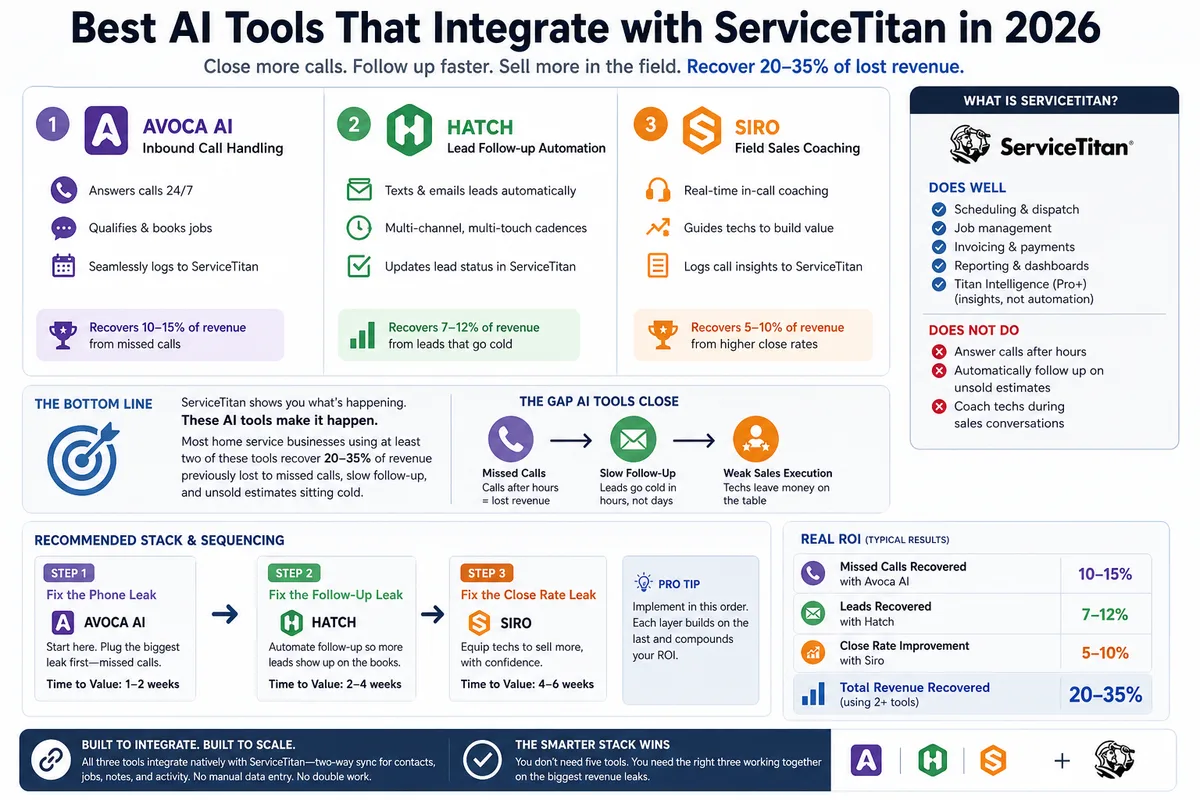
Best AI Tools That Integrate with ServiceTitan in 2026
Most ServiceTitan shops miss a meaningful share of inbound calls and leave most estimates unsold. These AI tools close those gaps inside ServiceTitan.