
How to Integrate an AI Receptionist on a Mobile Phone in 2026
Integrating an AI receptionist on a mobile phone means routing your existing business number to a cloud-based AI voice platform via call forwarding or SIP configuration. The AI handles inbound calls independently of your device, books appointments, qualifies leads, and pushes summaries to your phone.
Most businesses can route their existing number to an AI receptionist through call forwarding, VoIP routing, or a dedicated number.
Epiphany Dynamics is an AI automation agency: we help businesses find and fix operational bottlenecks with AI receptionists, lead follow-up, and workflow automation.
The free 30-minute AI Operations Audit is a conversation about a normal week in your business and where the work piles up. We find the one change that would give you the most time back and send you a plain-English plan for it. No forms and no pitch.
Book a free AI audit
Patrick Gibbs
Integrating an AI receptionist on a mobile phone means routing your existing business number to a cloud-based AI voice platform via call forwarding or SIP configuration. The AI handles inbound calls independently of your device, books appointments, qualifies leads, and pushes summaries to your phone. Setup effort and monthly cost depend on call volume, routing method, integrations, and how much testing the workflow needs.
The question usually comes from someone who just missed another call. They were on a job, in a meeting, or driving, and the phone rang at exactly the wrong moment. Whoever called didn't leave a voicemail. That lead is gone. When you start counting how often this happens, the real cost of missed calls adds up faster than most business owners expect.
The good news is that you almost certainly have everything you need to run an AI receptionist right now. You have a phone number. You have a smartphone. That's enough. The AI doesn't live on your device. It lives in the cloud, answers calls before they reach you, and reports back when something needs your attention.
What "Integrating on Mobile" Actually Means
Mobile integration for an AI receptionist requires no app installation on your phone. The setup happens at the phone number level, not the device level. Your business number routes to the AI platform, which handles calls entirely in the cloud. Your mobile receives text or email summaries and booking notifications after each call completes.
This is the part that surprises most people. They picture an app running in the background on their phone, intercepting calls before the ringer fires. That's not how it works. The AI platform is a cloud service with its own phone infrastructure. Calls go there first, get handled, and then your phone gets a notification.
Your phone's actual role in this system is minimal on purpose. You get a summary that says something like "Caller asked about pricing for a bathroom remodel, seemed qualified, offered to schedule a site visit but said they'd call back." You read it. You decide if you want to follow up. In many cases, the AI already booked the appointment and you're reading the recap.
The implication is that the AI works whether your phone is on, charged, or in range. It doesn't care. A call comes in at 11 PM on a Saturday, the AI answers, handles it, and logs the result. You see it Sunday morning. That's the whole value proposition in one example.
The Three Ways to Route Calls to an AI Receptionist
There are three practical routing methods for mobile AI receptionist integration: native call forwarding using carrier-level codes, VoIP or SIP configuration in a telephony dashboard, and a dedicated number provisioned directly by the AI platform. Solo operators often start with call forwarding; businesses with higher call volume or more complex routing benefit from VoIP routing.
Call Forwarding
This is the fastest path. Most US carriers let you forward calls unconditionally using *72 followed by the destination number. To forward only when you don't answer, use *61. To forward when your line is already busy, *67. You dial the code from your phone, and incoming calls reroute to wherever you pointed them, including your AI platform's inbound number.
The limitation is that call forwarding is binary. You're either forwarding everything or you're not. You can't tell your carrier to forward calls from unknown numbers but not from saved contacts. If you need that kind of logic, you need the next option.
VoIP or SIP Routing
If your business runs on a VoIP number through Twilio, Vonage, RingCentral, or Google Voice, the routing configuration lives in a dashboard rather than on your phone. You point the inbound call handler at your AI vendor's SIP address or webhook URL. This is where real flexibility opens up: route calls to the AI after 6 PM, route to AI when you're already on another call, or route based on caller ID patterns.
For businesses that want human coverage during business hours and AI handling for overflow and after-hours traffic, comparing platforms like Twilio and Vonage on their routing rule capabilities matters. The price differences are modest; the flexibility differences are significant.
Dedicated AI Business Number
Some AI receptionist platforms provision you a phone number directly as part of the subscription. You use that number on your website, Google Business Profile, and anywhere else customers reach you. Your personal mobile stays private. The AI handles everything on that number, and you receive real-time or batched notifications based on your preference settings.
This is the cleanest option for a solo operator who doesn't want to manage routing logic. The downside is that switching platforms later means either porting the number or updating all your listings, which is a real headache if the number has been in use for years.
| Method | Setup Shape | Routing Flexibility | Best For |
|---|---|---|---|
| Call Forwarding | Carrier-code configuration | Low (on/off rules only) | Solo ops, fast start |
| VoIP/SIP Routing | Dashboard and routing-rule configuration | High (time, caller ID, logic rules) | Multi-rule, higher volume |
| Dedicated AI Number | Platform-provisioned number | Medium (platform controls routing) | Clean separation, new businesses |
The Setup Process: Step by Step
AI receptionist integrations tied to a mobile setup follow a predictable sequence: select a platform with the integrations your business actually uses, configure your preferred call routing method, build the AI's knowledge base with your services and FAQ, then run test calls across realistic scenarios before going live.
Step 1: Pick a Platform
The main platforms handling inbound call AI with mobile notification delivery include Retell AI, VAPI, Bland AI, and Air AI. Pricing differences are real, but they change often and depend on usage, voice provider, and feature depth. The deciding factor is usually integrations and call quality, not a tiny usage-rate difference.
The actual deciding factor is integrations. If your appointments run through Calendly or Acuity, verify native support before committing. If you use GoHighLevel or HubSpot, check whether the connection is native or Zapier-based. A Zapier bridge works but adds latency and its own monthly cost. The details of creating and configuring the AI receptionist itself vary by platform, but the platform choice is where the whole setup starts.
Step 2: Configure Routing
Get your inbound number from the platform dashboard. If you're using call forwarding, dial your carrier's forwarding code from your mobile pointing to that number. If you're using VoIP, update your inbound call handler in the provider's settings to point at the AI platform's SIP address or webhook. This step is simple when you have credentials for whatever system you're configuring. If you don't have admin access to your VoIP dashboard, track that down first.
Step 3: Build the Knowledge Base
This step takes the most time and gets the least attention from people setting this up themselves. The AI needs to know everything a competent human receptionist would: your hours, your services with price ranges, your booking process, how to handle a frustrated caller, and a defined escalation path for situations that require you directly. Most platforms let you paste in a website URL or document and extract the relevant details, but plan to review and fill gaps manually.
Budget real attention here. Businesses that give the AI a thin summary end up with a system that deflects too many calls to "I'll have someone follow up with you." That's an input problem, not a platform failure.
Step 4: Test It Before Launch
Call your own number from a different phone. Run realistic scenarios: a first-time caller asking about pricing, a repeat customer trying to reschedule, someone asking a question that isn't in your FAQ, a caller who seems frustrated, and a caller who wants to speak to a person right now. Listen for where the AI stumbles or gives a vague non-answer. Fix those gaps before real customers hit them. This part is non-negotiable.
For another angle, see AI Secretary Costs in 2026: What Drives Pricing.
What the Numbers Look Like in Practice
The ROI model starts with missed-call volume, booking rate, average ticket, and the quote for the AI receptionist. If the value of recovered booked calls exceeds the platform cost and setup effort, the system has a business case.
Run that math against your own numbers. Take your monthly call volume, estimate honestly what share you're missing, multiply by your rough close rate and average ticket size. That result is the value of what AI call coverage is worth to your specific business, before you even factor in the time you'd spend returning calls and playing phone tag with people who've already moved on.
The comparison to a part-time human receptionist is sharper when you include payroll taxes, training time, turnover, and coverage gaps. The full AI vs. human receptionist ROI breakdown accounts for those costs more completely than a simple hourly comparison.
Call answer rates tell another part of the story. A solo operator juggling field work, existing customers, and inbound calls realistically answers only a little more than half of their calls. AI-handled lines answer essentially every call. The gap between those two figures is real money, not a rounding error.
Where This Integration Actually Fails
AI receptionist integrations on mobile fail for three specific reasons: an undertrained knowledge base that causes the AI to deflect qualified leads, routing misconfiguration that creates dead zones where calls ring to nothing, and no emergency escalation path for time-sensitive situations. All three are preventable during setup, but skipping any one of them creates compounding problems after launch.
The knowledge base problem shows up as excessive deflection. The AI says "I'll have someone follow up with you" to questions it should be able to answer directly. That sounds reasonable until you realize the caller already moved on to a competitor. Audit call recordings in the first week of going live. Every question the AI deflects on, add the answer to the knowledge base. This isn't a one-time task; it's a short recurring maintenance job.
Routing misconfiguration is less common but more damaging when it happens. If your carrier forwarding rule has an error, or your VoIP webhook URL is wrong, calls ring to nothing. The caller gets a dead line. You never know it happened because there's no record of it. Test your routing from a separate phone number before going live, and test it again any time you make changes to your carrier account or VoIP configuration.
The escalation gap is a judgment call most people skip entirely. Some calls need a human immediately: a caller describing a physical emergency, a legal situation, a decision that requires the business owner. Your AI needs a defined path for those calls. Most platforms support a "press 0 for urgent matters" option that transfers directly to your mobile. Set it up. Understanding where AI call handling actually has limits helps you calibrate that escalation threshold for your specific business type and customer base.
One more failure mode worth flagging: the AI gets trained once and never touched again. Service menus change, pricing shifts, seasonal offerings come and go. An AI running on an outdated knowledge base gives callers outdated information. Build a recurring review into your process. Check call recordings, look for deflections and errors, update the knowledge base. That's the maintenance overhead for running a system that answers essentially every call.
Integrating an AI receptionist on your mobile setup is less technically complex than most people expect going in. The hard part is discipline during setup: building a real knowledge base, running real test scenarios, and configuring a real escalation path. Do that work up front and the system runs itself. Skip it and you've built something that sounds impressive and frustrates callers. If you want help scoping what the right configuration looks like for your specific business type and call volume, Epiphany Dynamics has worked through this with service businesses across several verticals.
Frequently Asked Questions
Q: What's the monthly cost to integrate an AI receptionist with your mobile phone?
Cost depends on call volume, voice platform, integrations, setup support, and whether you need human escalation. Compare the quote against your missed-call value and the cost of adding human coverage.
Q: How long does it take to set up AI receptionist call routing?
Setup happens at the phone number level through call forwarding or SIP configuration with your carrier. Once configured, the cloud-based AI begins handling inbound calls without requiring any app installation on your device.
Q: Can an AI receptionist automatically qualify leads and schedule appointments?
Yes: the AI independently qualifies callers, books appointments directly into your calendar, and sends call summaries and confirmations to your phone. It operates entirely in the cloud, so you receive notifications rather than actively managing the system throughout your day.
Q: Does AI receptionist integration work with any carrier and phone system?
Yes, it works with any phone number and standard carrier service through call forwarding or SIP configuration. No special equipment or existing PBX infrastructure is required: a phone number and smartphone are all you need to get started.
Patrick Gibbs
AI Automation Expert
Patrick Gibbs helps professional practices implement AI automation that captures more leads, books more appointments, and scales without adding overhead. He's the founder of Epiphany Dynamics and creator of the AI Front Desk system.
Related Solutions
Build this into a real workflow
Related Posts

Best AI Receptionist for Small Business: How to Choose
The best AI receptionist for a small business is the one that answers quickly, books or routes correctly, escalates cleanly, and fits the tools your team.
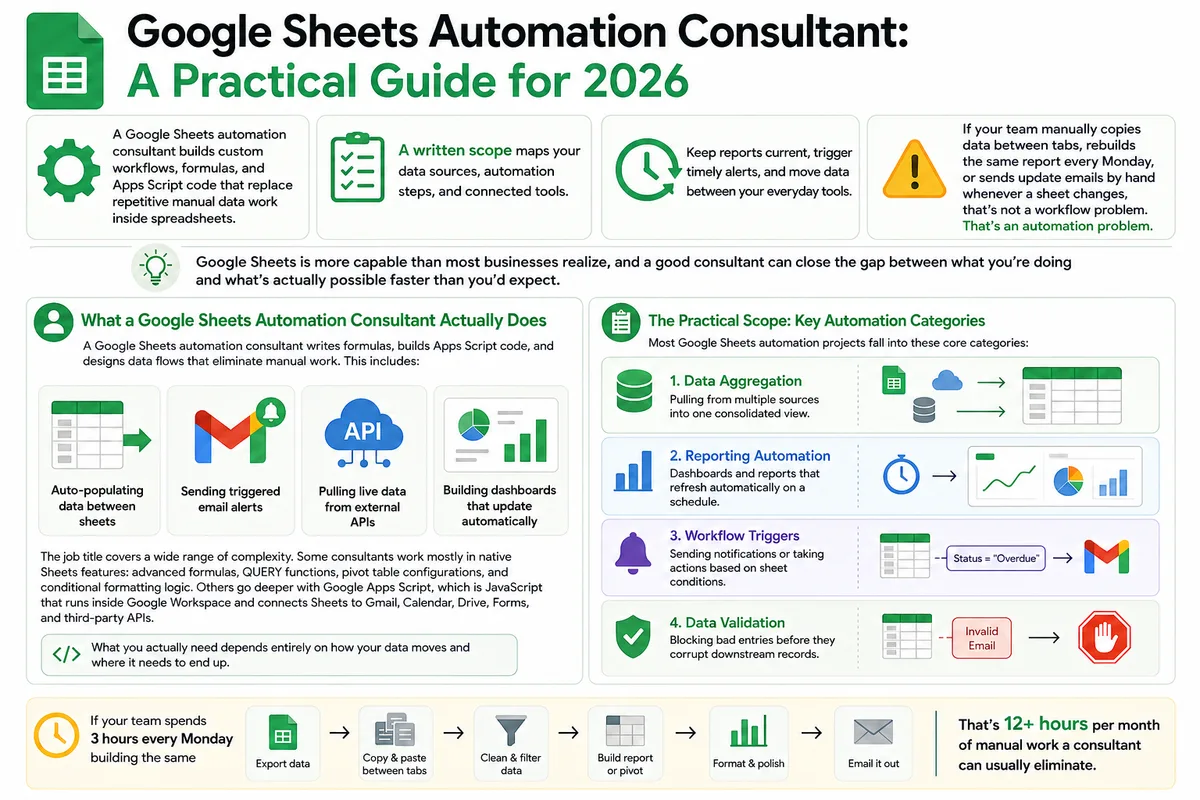
Google Sheets Automation Consultant: A Practical Guide for 2026
Most businesses don't track what spreadsheet work actually costs them. Here's what a Google Sheets automation consultant does in 2026, how to judge the value.
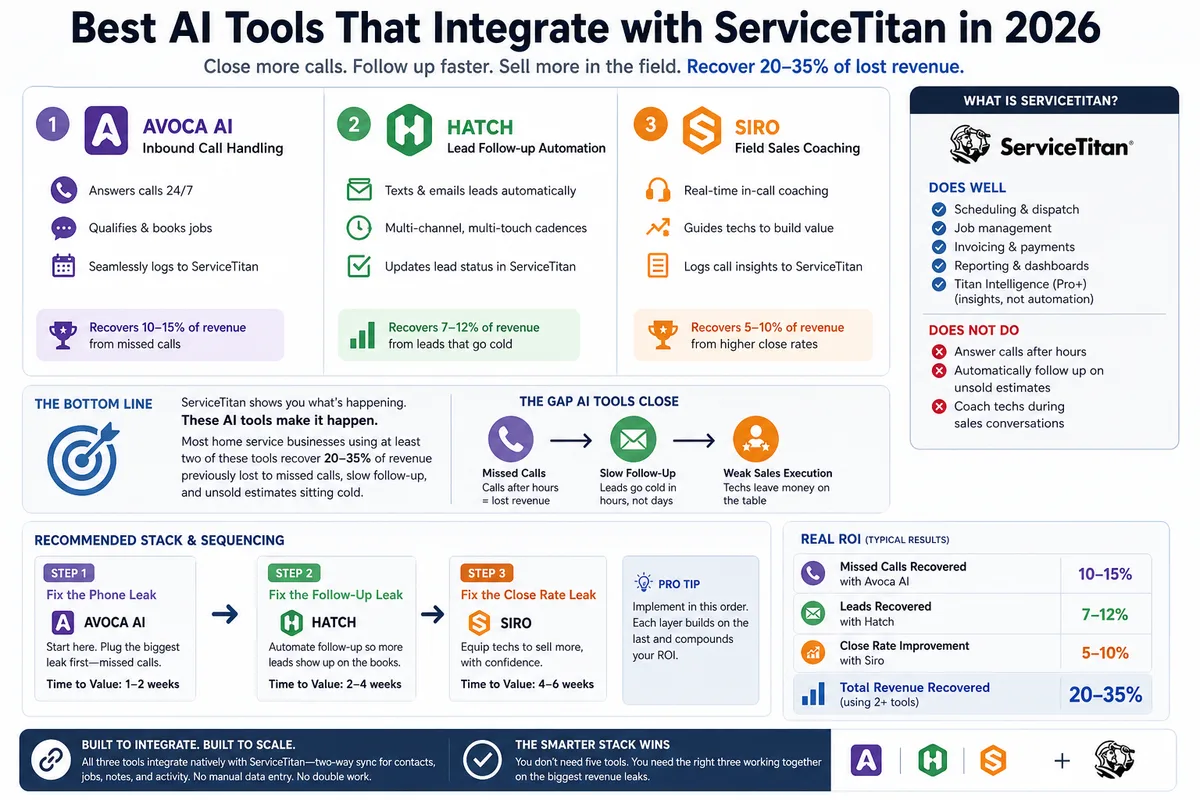
Best AI Tools That Integrate with ServiceTitan in 2026
Most ServiceTitan shops miss a meaningful share of inbound calls and leave most estimates unsold. These AI tools close those gaps inside ServiceTitan.