
Business Growth
How to Test AI Automation for Small Businesses Before You Scale
Many small businesses that adopt AI tools abandon them within a few months. The gap between success and failure isn't the tool.
The free 30-minute AI Operations Audit is a conversation about a normal week in your business and where the work piles up. We find the one change that would give you the most time back and send you a plain-English plan for it. No forms and no pitch.
Book a free AI audit
Patrick Gibbs
Many small businesses that adopt AI tools abandon them quickly, not because the tools don’t work, but because they skip structured testing and go straight to full production deployment. The businesses that succeed with AI automation run structured pilots, measure against baselines, stress test edge cases, and make go/no-go decisions based on data before scaling. This post gives you the framework: how to pick the right first process, what to measure, and how to make a defensible call on whether to commit or walk away.
Somewhere between the vendor demo and the contract signature, a lot of small business owners make the same mistake: they go live. Not piloting. Live. Full production deployment on a tool they’ve seen perform in a controlled demo environment, running data that the vendor hand-selected to make it shine. Later, the automation is switched off, the contract is still running, and the owner is back to doing things manually, except now they’re more cynical about AI than they were before.
Broad industry research has estimated that a large share of large-scale digital transformation initiatives fall short of their stated objectives. For small businesses, where there’s no IT department to absorb the fallout and no budget buffer for expensive mistakes, the consequences are more immediate. Our AI automation cost and pricing guide covers what these tools actually cost, but spending wisely starts with testing wisely. A bad automation rollout doesn’t just waste money: it erodes trust in the technology, makes it harder to get employee buy-in on future attempts, and burns time you don’t have.
The businesses that actually succeed with AI automation share one consistent habit: they test before they commit. Not test in the “click around and see how it feels” sense: they run structured pilots, measure against baselines, stress test edge cases, and make go/no-go decisions based on data. This article breaks down exactly how to do that, step by step.
Why “Just Try It” Is Not a Testing Strategy
The AI automation market is crowded and moving fast. Vendors are skilled at selling outcomes. And to their credit, most modern tools do work, in the right context, deployed correctly, on the right process. The problem isn’t that the tools don’t work. The problem is that small businesses frequently adopt tools for the wrong process, or implement them without the foundational setup required to produce results.
Testing isn’t about being skeptical of AI. It’s about understanding what “working” means for your specific operation before you scale anything. The cost difference between a structured pilot and a full deployment gone wrong can be enormous, not just in dollars, but in staff morale and customer trust.
Consider the difference between two scenarios. A dental office deploys an AI appointment scheduling bot across the full patient base without testing how it handles edge cases like insurance verification failures, time zone mismatches, or patients who don’t respond to the initial confirmation prompt. The cleanup damages the internal reputation of the technology.
Contrast that with a law firm that pilots the same category of tool with one paralegal and one client category first. They identify failure modes, resolve what can be resolved with vendor support, determine which issue is a dealbreaker for their use case, and make an informed decision before touching client relationships at scale. The second firm isn’t being slow. They’re moving faster in the long run because they’re not cleaning up an avoidable disaster.
Process Selection: Starting With the Right Target
Not every process is worth automating, and not every automatable process should be the first one you test. The goal of an initial pilot isn’t just to evaluate the tool: it’s to generate a credible proof of concept that builds organizational confidence. That means starting with a process that meets specific criteria.
A good first automation target is high repetition (happens frequently enough to generate meaningful data), well-defined (inputs and outputs are consistent and documented, since fuzzy processes make fuzzy test results), low-risk if it fails (consequences of a bad test are recoverable, so don’t start with payroll or patient billing), and measurable (you can quantify the current state with baseline numbers before the pilot starts).
A useful exercise is to list your most time-consuming recurring tasks and score each one across these criteria. The process with the highest combined score is your first test candidate. Here’s what that scoring might look like for a service business:
| Process | Frequency | Well-Defined | Low Risk | Measurable | Test Priority |
|---|---|---|---|---|---|
| Client intake forms | High | High | High | Yes | ★★★★★ |
| Invoice follow-up emails | High | High | High | Yes | ★★★★★ |
| Social media scheduling | Moderate | Medium | High | Partial | ★★★ |
| Custom project scoping | Low | Low | Medium | Difficult | ★ |
| Payroll processing | Low | High | Low | Yes | ★★ |
| Appointment reminders | High | High | High | Yes | ★★★★★ |
Client intake, invoice follow-up, and appointment reminders all score highest. Our guide to automating repetitive tasks covers a phased implementation roadmap for these exact categories because they’re frequent, structured, recoverable if they fail, and straightforward to measure. Custom project scoping fails on several criteria and should not be anywhere near your first pilot.
Establishing Baselines Before You Touch Anything
This is the step most small businesses skip entirely, and it’s the reason they can’t answer the question “Did the automation actually work?” three months later. Before running a single pilot, you need hard numbers on the current state of the target process. This sounds mundane. It is mundane. Do it anyway.
For any target process, track the following before the pilot begins:
- Time spent: How many staff-hours per week does this process consume? Track at the task level, not estimated.
- Error rate: What percentage of instances involve an error, rework step, or exception handling?
- Volume: How many instances occur per week? What’s the weekly variance?
- Cost per instance: Staff time multiplied by fully loaded hourly rate, including salary, benefits, and overhead.
- Downstream effects: What happens when this process is delayed or incorrect? Can you put a number on it?
For example, if your accounts receivable team spends recurring time chasing overdue invoices, your baseline cost is the time spent multiplied by the fully loaded hourly cost of the person doing the work. Any automation tool that costs less than that baseline and performs the task with comparable quality has a credible ROI case before you account for improved collections or recovered staff capacity.
Write these numbers down. Put them in a shared document. Make sure everyone who touches the process agrees on them before the pilot starts. These become your ground truth for the entire evaluation. Without a baseline, you’re making a subjective decision dressed up as an objective one.
The Testing Framework
Once you have a baseline and a target process, structured testing follows five stages. Skipping stages doesn’t save time: it pushes problems downstream where they’re more expensive to fix.
Stage One. Controlled Sandbox
Test the tool in complete isolation from real operations. Use synthetic data or historical data that can’t cause harm. The goal here isn’t to determine whether the tool works. It’s to learn how the tool works. Read the full documentation. Work through edge cases manually. Get the team member who will own this tool comfortable before any live data touches it. Identify integration requirements and configuration decisions upfront. Deliverable: a list of known limitations and a configuration checklist.
Stage Two. Limited Live Pilot
Select a small, contained subset of real instances. Run the automation in parallel with the existing manual process. Do not turn off the manual process yet. Both run simultaneously. Compare outputs side by side on every instance. This is where you close the gap between “works in a demo” and “works in our environment with our data and our integrations.” Track every instance. Log every discrepancy. Deliverable: a discrepancy log and a ranked list of unresolved failure modes.
Next on this subject: Virtual Assistant for Beginners: What Actually Works.
Stage Three. Failure Mode Testing
Deliberately try to break it. What happens when a customer submits a form with incomplete information? What happens when an email bounces? What happens if two triggers fire simultaneously? What happens if the upstream data source is temporarily unavailable? Mature automation handles failure gracefully: it logs the exception, routes it to a human, and doesn’t silently consume the error. If the tool can’t tell you what happened to a failed instance, that is a serious production risk. Deliverable: Documented failure modes with a mitigation approach for each.
Stage Four. Full-Volume Parallel Run
Scale to normal volume while the manual process continues to run in parallel. This is expensive in the short term because you’re doing double work. It’s worth it. This stage surfaces volume-related issues: API rate limits, integration timeouts, edge cases that only appear at scale, and performance degradation under load. The comparison at this stage is the most reliable data you’ll have. Deliverable: statistical comparison of automation output versus manual output across the full pilot set.
Stage Five. Go/No-Go Decision and Cutover
Review all collected data against your pre-defined success criteria. If the automation meets or exceeds every criterion: cut over, document the new workflow, and formally decommission the manual process. If it doesn’t: either address the specific gaps in a defined remediation window or kill the project. No emotional attachment to sunk cost. A clean failure is worth more than a limping deployment. Deliverable: A documented go/no-go decision with the data that drove it.
Defining Success Criteria Before You Begin
This is the other step that gets skipped constantly, and it’s what turns a pilot into an indefinite gray zone. Before the first stage begins, write down, in specific, measurable terms, what success looks like. Then get sign-off from whoever is making the deployment decision.
Here’s the difference between criteria that work and criteria that don’t:
| Weak Criteria | Strong Criteria |
|---|---|
| "It works better than before" | "Error rate improves against the agreed baseline" |
| "The team feels comfortable with it" | "Process owner signs off after real pilot usage" |
| "It saves us time" | "Weekly staff hours drop enough to justify the tool cost" |
| "Customers seem fine with it" | "Complaint rate does not rise against baseline" |
| "No major issues during testing" | "No unrecoverable data errors during the parallel run" |
Strong criteria are binary: either the data supports the deployment or it doesn’t. A third party should be able to look at your pilot evidence and give you a clear yes or no without needing to interpret anything. Vague criteria lead to endless deliberation and tools that never quite get fully deployed or properly killed.
ROI Calculation: Running the Numbers Before You Commit
At some point, financial justification needs to be explicit. Here’s a straightforward framework that works for most small business automation decisions.
The Core Calculation
Annual Labor Savings:
Recurring hours saved x fully loaded hourly cost
Error Reduction Value:
Current error volume x average cost to resolve one error
First-Year Tool Cost:
Subscription cost + implementation labor + training time + maintenance time
ROI:
(Savings - tool and labor cost) divided by tool and labor cost
Model: Invoice Follow-Up Automation
Use your own accounts receivable workflow as the model. Measure the time spent on manual invoice follow-up, the fully loaded hourly cost of the person doing it, the number of rework cases, the value of faster collections, and the subscription plus setup cost of the automation.
| Component | How to Calculate It | Value |
|---|---|---|
| Labor savings | Hours saved multiplied by fully loaded labor cost | Your measured value |
| Error/rework reduction | Rework cases multiplied by resolution time and labor cost | Your measured value |
| Collection rate uplift | Improved collection timing or reduced overdue balance | Your measured value |
| Total Annual Benefit | Your total benefit | |
| Tool subscription | Subscription or usage fees | Your tool cost |
| Implementation | Setup labor, migration, and testing | Your implementation cost |
| Ongoing maintenance | Review, exception handling, and updates | Your maintenance cost |
| Net First-Year Benefit | Your benefit minus your costs | |
| ROI | Net benefit divided by total automation cost | Your ROI |
If the model shows a strong return and the pilot criteria are met, you have a defensible business case. If the return is weak, ask whether the target process is correct, whether the tool is too expensive, or whether automation is the wrong solution for this process right now.
Red Flags That Should Kill a Pilot
Not every pilot ends in deployment. Some of the most valuable outcomes from structured testing are the projects you choose not to ship. During your testing phases, watch closely for these signals:
- The tool can’t explain its failures. If an exception happens and the system produces no log, no error message, and no alert, you will be blind in production when it matters most.
- Integration errors exceed your acceptable threshold. If errors require manual resolution often enough to erase the savings, the automation is not working.
- Staff workarounds multiply during the pilot. If your team starts inventing unofficial workarounds, those workarounds become invisible technical debt that quietly breaks the automation over time.
- Vendor support is slow or evasive. A vendor that dodges critical bugs during a controlled pilot will not perform better when you’re in full production and a client is affected.
- You’ve extended the pilot and still aren’t hitting criteria. Repeated pilot extensions without meeting success criteria are a data point, not a temporary setback. Cut it.
Killing a pilot is not a failure. It is the testing process working exactly as designed. Running a substandard tool into full production because you’re emotionally invested in the decision you made, or because the vendor is persuasive, is the actual failure mode worth avoiding.
Building a Repeatable Playbook
The value of running one structured pilot well extends far beyond that single process. Every element of the framework (the baseline documentation, the staged rollout, the success criteria template, the ROI model) becomes the foundation of a repeatable playbook that your team can apply to every future automation decision. The second pilot takes roughly half the time of the first. By the third, the framework is organizational muscle memory.
This matters because AI automation is not a one-time initiative. Small businesses that use it well tend to layer it incrementally: one process validated, then another, then another, until the compounding effect becomes significant. Industry surveys of small businesses consistently find that those that have successfully implemented several automation workflows report meaningfully lower operational costs than businesses still relying primarily on manual processes. The gap between the early adopters and the laggards is widening. The barriers blocking AI adoption in local service businesses are more psychological than technical, but the early adopters got there through iteration, not through betting everything on a single high-stakes deployment.
The small businesses seeing real returns from AI automation aren’t necessarily using better tools than everyone else. They’re using a better process to adopt and test those tools. Start with one process. Establish a real baseline. Run a real pilot. Write down what success looks like before you begin. Make a data-backed decision at the end. Run that framework consistently and the results compound over time.
For businesses looking to move faster without sacrificing rigor, working with a partner who has already built and pressure-tested automation workflows across multiple industries can meaningfully compress the learning curve. Companies like Epiphany Dynamics focus specifically on this kind of structured AI implementation for small businesses. But regardless of who helps you get started, the discipline of testing first is a capability you build internally, and it pays dividends on every initiative that follows.
For a concrete record-level example, use the CRM integration test. If a live build fails those checks and needs diagnosis, review AI Rescue before expanding it.
Frequently Asked Questions
Q: How long should an AI automation pilot run before a go/no-go decision?
A structured pilot should run long enough to cover a sandbox test, a limited live parallel run, failure-mode testing, and a full-volume parallel run before cutover. Skipping stages compresses the timeline but pushes failure modes into production where they cost more to identify and fix.
Q: What is the most common mistake when piloting AI automation for the first time?
Skipping the baseline measurement step. Without hard numbers on your current process (time spent, error rate, cost per instance), you have no objective way to evaluate whether the automation improved things. Success criteria must be defined and agreed upon before the pilot starts, not after.
Q: How do you calculate ROI on an automation tool before committing to it?
Multiply recurring hours saved by your fully loaded hourly cost. Add the value of error reduction. Subtract the tool, setup, training, and maintenance cost. If the return is weak, reconsider whether this is the right process to automate first.
Q: Which business processes are the best first candidates for AI automation?
High-frequency, structured, recoverable, and measurable processes make the best first candidates: appointment reminders, invoice follow-ups, and client intake all score high. Custom project scoping and complex negotiation tasks score low and should be automated only after your foundational workflows are proven.
Q: When should you kill an automation pilot rather than extend it?
Repeated pilot extensions without meeting pre-defined success criteria are a data point, not a temporary setback. A vendor that cannot resolve blocking issues during the pilot is showing you their production support capability. Kill the project cleanly and document what you learned rather than extending indefinitely.
Patrick Gibbs
AI Automation Expert
Patrick Gibbs helps professional practices implement AI automation that captures more leads, books more appointments, and scales without adding overhead. He's the founder of Epiphany Dynamics and creator of the AI Front Desk system.
Related Solutions
Build this into a real workflow
Related Posts
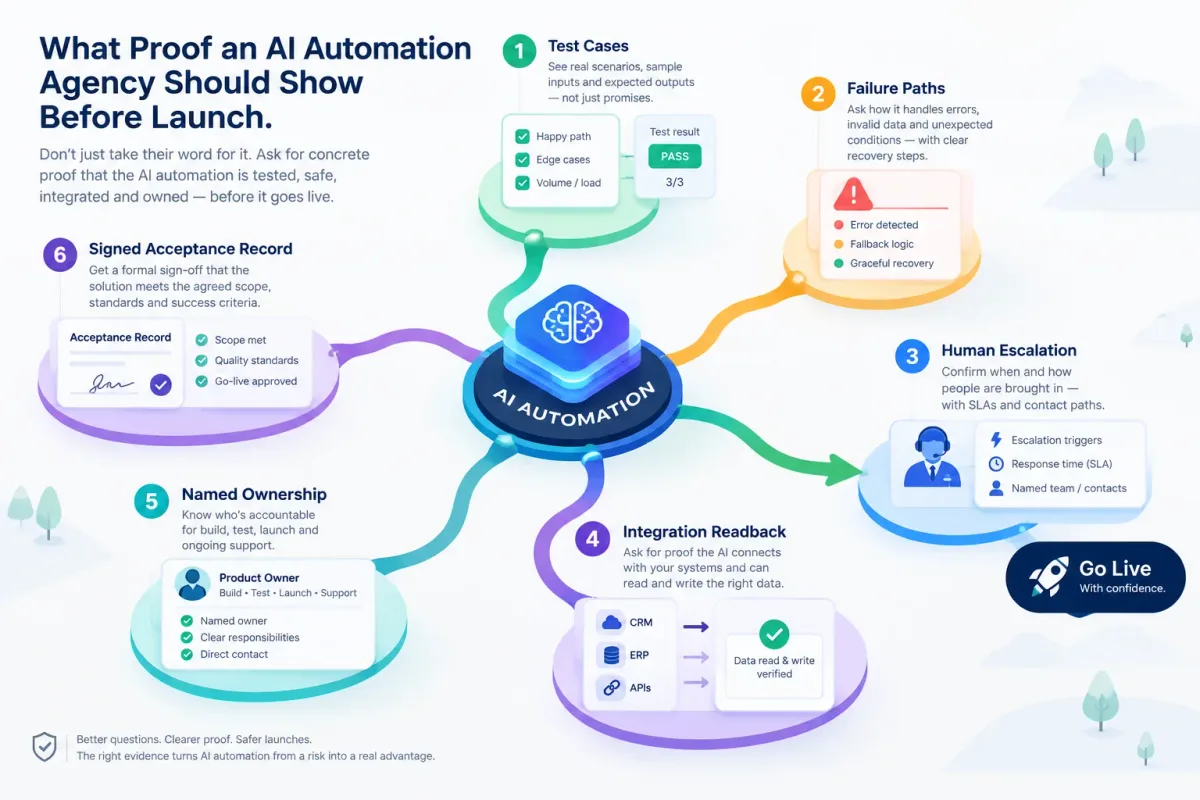
What Proof an AI Automation Agency Should Show Before Launch
Before an AI automation goes live, ask for test cases, failure paths, human escalation, integration readback, named ownership, and a signed acceptance record.

AI Admin Tools for Plumbers: What They Are and How to Choose
AI admin tools automate dispatch, reminders, invoicing follow-up, missed calls, and review requests for plumbers. What they do and how to choose.

AI Automation Agency for SMBs: What to Look For
A practical guide to choosing an AI automation agency for SMB workflows, from call intake and scheduling to CRM updates, follow-up, and maintenance.